
Best personalised phone cases for Google Pixel 2026
· 13 min read
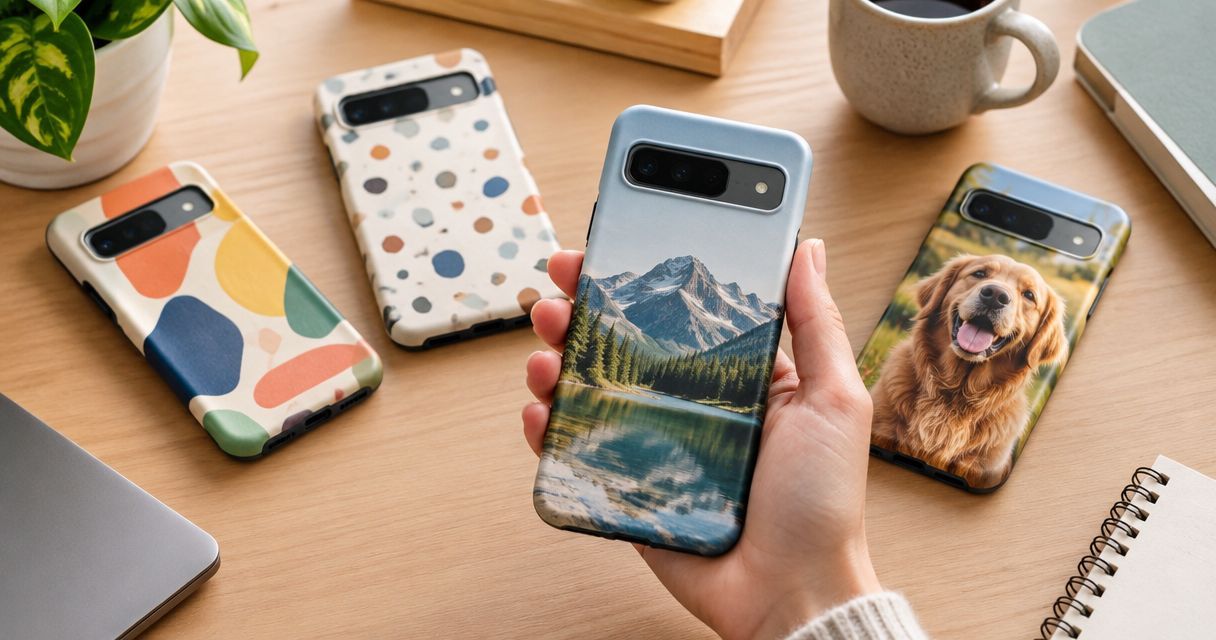
Best overall: a single-photo design. Best for shared memories: a collage. Best for a simpler look: initials. These are the strongest design choices for personalised phone cases for Google Pixel in 2026; confirm your exact handset model before choosing a case or uploading photos.
TL;DR
- Single-photo personalised phone cases are the best default for a clear, recognisable Google Pixel design.
- Pixaprints offers personalised phone cases; confirm exact Google Pixel compatibility before starting your design.
- Choose a collage for several memories, initials for simplicity, or a pet portrait for an animal lover.
- Check the camera opening, image crop and case construction separately: a good design does not establish protection.
Why your Pixel model matters more than the design
The best-looking case is the wrong choice if it does not fit your phone. Read the full model name in your phone settings, then match it against the case listing rather than relying on the word Pixel alone.
Camera openings, buttons and the shape of the handset determine fit. A photograph of a similar-looking phone is not a compatibility check, and a personalised design does not make a case universal.
Pixaprints personalised phone cases suit people who want to turn their own photographs into an everyday keepsake. For a Google Pixel order, first confirm that the exact handset appears among the supported models. This guide ranks design approaches, not tested case brands or verified Pixel-specific products.
Once fit is settled, the main decision is what you want to see every day. The guide to designing a personalised phone case that looks good explores the layout choices behind that decision.
What makes the best personalised phone cases?
For your 2026 shortlist, use these criteria before choosing a favourite picture:
- Exact fit: the listing must name your handset, including any model suffix.
- Clear subject: your main person, pet or detail should remain recognisable at case size.
- Camera clearance: the opening must not remove the part of the picture that matters most.
- Readable layout: text and photographs need room rather than competing for attention.
- Suitable construction: assess the shell, edges and protection information independently of the artwork.
- Personal relevance: choose a memory or style the recipient will enjoy carrying, not simply your favourite photograph of them.
A strong layout cannot rescue an unsuitable case. Equally, choosing the right shell does not fix a photograph cropped through someone's face. Treat fit, protection and design as separate decisions.
Best Pixel case designs at a glance
These options describe artwork you can plan, not a promise that a particular retailer offers each template or feature. Check the design tools and supported handset before committing to a layout.
| Rank and design | Best for | Standout feature | Key limitation |
|---|---|---|---|
| 1. Single-photo design | One favourite memory | Gives the main subject the most space | Depends on a crop that works around the camera |
| 2. Photo collage | Several connected memories | Brings different moments together | Individual pictures become smaller |
| 3. Initials design | A restrained everyday look | Keeps the composition simple | Depends on typography and placement |
| 4. Pet portrait | An animal lover | Makes one familiar face the focus | Busy backgrounds distract from the pet |
| 5. Travel landscape | A favourite place | Uses scenery rather than a close-up portrait | Wide photographs can lose important details |
1. Single-photo design: best for one favourite memory
A single-photo design gives one image the whole job. Choose a portrait, a candid moment or a photograph with a clear subject and enough surrounding space to adjust the crop.
This is the strongest default for personalised phone cases in 2026 because you do not need several pictures or extra text to explain the memory. Start with 1 photo, then preview it against the actual camera opening rather than a plain rectangle.
Single-photo design pros:
- Keeps the person or moment easy to recognise.
- Avoids competing picture sizes and borders.
- Lets a meaningful photograph stand on its own.
Single-photo design cons:
- A tight original crop leaves little room for adjustment.
- A distracting background occupies a large part of the design.
Best for: someone with one photograph they would happily keep as their phone wallpaper.
Choose an image with the face away from the camera opening and outer edges. If the subject only fits when you cut away something important, change the photograph rather than forcing it.
Verdict: Buy a single-photo design once the exact Pixel fit and final crop are confirmed.
2. Photo collage: best for several connected memories
A collage combines different moments in one design. It works particularly well when the photographs share a subject, such as a friendship, a holiday or time spent with family.
Start your draft with 3 photos: a main image and supporting moments. That is a design starting point, not a template specification; use fewer if the preview looks crowded.
Photo collage pros:
- Includes more than one meaningful moment.
- Gives a gift a small story rather than a single scene.
- Allows a mix of close-ups and wider photographs.
Photo collage cons:
- Each photograph has less space than a single-image design.
- Unrelated colours and backgrounds make the layout harder to read.
Best for: a recipient who would struggle to choose just one memory.
Keep the pictures connected. A group photograph, a close-up and a detail from the same outing feel more deliberate than an assortment chosen only because the files were nearby.
Check every small image individually. A layout that looks balanced as a whole still fails if a face disappears behind a border or camera opening.
Verdict: Buy a collage for a shared story; skip it when every photograph needs a large crop.
3. Initials design: best for a restrained everyday look
An initials design makes lettering the focus instead of a photograph. Plan a simple background and a short set of characters, then check whether the chosen editor supports the text treatment you want.
For a 2026 gift, initials offer a way to make the case personal without displaying a family photograph. The trade-off is that the lettering has nowhere to hide: spacing and placement become the whole design.
Initials design pros:
- Keeps the surface visually uncluttered.
- Avoids choosing a personal photograph on someone else's behalf.
- Makes a simple colour combination the main style decision.
Initials design cons:
- Requires suitable text controls in the design editor.
- An unsuitable font can change the intended character completely.
Best for: someone who prefers a quiet, graphic accessory to a photo-led gift.
Keep the initials away from edges and hardware openings. Preview the design at approximately the size you will see it in your hand, not only enlarged on a screen.
Avoid adding a full name, date and quotation simply because space remains. Empty space is part of this design's appeal.
Verdict: Buy an initials design if the editor supports your intended lettering; otherwise skip it.
4. Pet portrait: best for an animal lover
A pet portrait puts a familiar face at the centre of the case. Choose a photograph with visible eyes, a clear expression and a background that does not compete with the animal.
A close-up often suits the narrow shape better than a distant photograph of a pet in a large garden. Leave room around ears and whiskers so the final crop does not feel accidental.
Pet portrait pros:
- Gives the case a clear, personal subject.
- Works without a caption or explanation.
- Turns an everyday snapshot into a keepsake.
Pet portrait cons:
- Motion blur remains visible in the finished image.
- Dark fur against a dark background can obscure the face.
Best for: someone whose favourite photographs feature their pet.
Choose expression over novelty. A sharp photograph of a familiar head tilt is a stronger starting point than a funny pose where the face is blurred or hidden.
For Pixaprints personalised phone cases, prepare the original photograph before uploading rather than a screenshot of it in a messaging app. Then assess the crop in the available preview.
Verdict: Buy a pet portrait when the face stays clear and comfortably inside the design area.
5. Travel landscape: best for remembering a favourite place
A travel landscape makes the place itself the subject. A beach path, mountain view or familiar street can feel personal without showing anyone's face.
The challenge is shape. A wide holiday photograph needs careful cropping to work on a tall case, especially when its most important details sit at opposite ends.
Travel landscape pros:
- Keeps a meaningful destination close at hand.
- Suits recipients who prefer scenery to portraits.
- Can use colour and atmosphere without added text.
Travel landscape cons:
- A narrow crop can remove the landmark that gives the image meaning.
- Small distant details become harder to recognise.
Best for: someone with a strong connection to a particular place.
Compare 2 crops of the same image before deciding: one centred on the main landmark and one following a path, shoreline or other line through the scene. Choose the version that still makes sense without the original photograph beside it.
Verdict: Buy a travel landscape when the place remains recognisable in the case-shaped preview.
Choose protection separately from personalisation
Your artwork tells you nothing about impact performance. For a 2026 purchase, read the case construction and protection details before treating a personalised shell as suitable for your daily routine.
The comparison between thin versus thick phone cases is about more than bulk: material, edge coverage and construction belong in the same decision. Thickness alone does not establish how a particular case performs.
Look for explicit information about the screen edge, camera surround and access to buttons and ports. If a listing makes a protection claim, read the stated test conditions rather than treating a descriptive label as proof.
Also check any charging or accessory compatibility you need. Do not assume that a printed design, a particular material or a familiar-looking shell confirms those features.
Hold the order if fit or protection information is unclear. Choosing another photograph is easy; correcting an unsuitable case after personalisation is a different problem.
Prepare your design before you order
A short preparation sequence keeps the important checks in the right order. Use it whether you are making a case for yourself or planning a surprise gift.
- Confirm model: copy the complete handset name from its settings and match the case listing.
- Choose original: locate the original photograph rather than a screenshot or forwarded copy.
- Set crop: position the subject around the actual camera opening and print area.
- Review preview: inspect faces, lettering, edges and any warnings before proceeding.
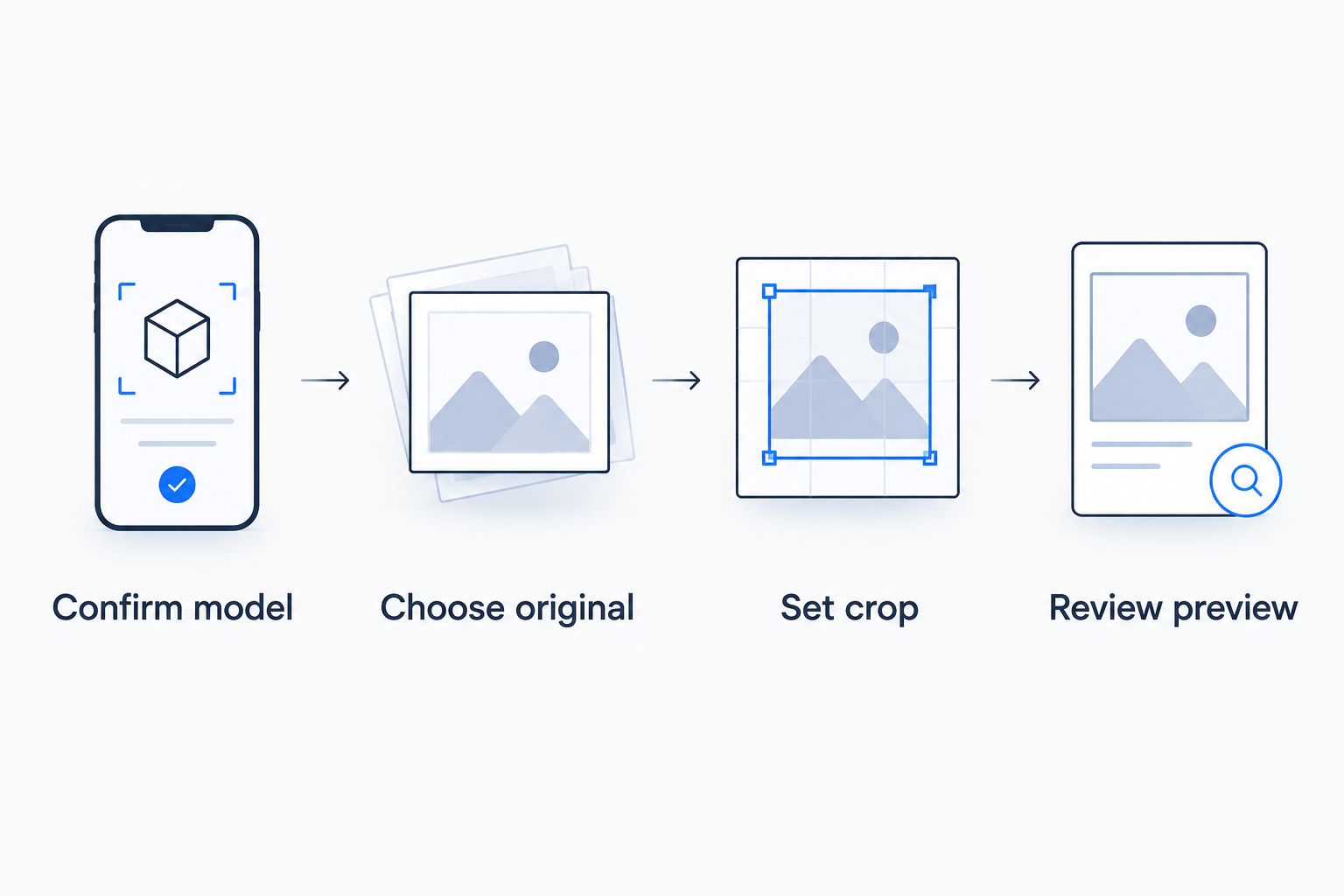
Confirm the handset before spending time on the artwork.
Keep an untouched copy of your original image. If an edit makes skin look unnatural or removes detail from fur, return to the original rather than adding more filters.
For a surprise gift, ask someone close to the recipient to confirm the phone model. Guessing from a photograph of their handset leaves the most important part of the order unresolved.
How the designs rank
The ranking prioritises clear subjects, manageable crops and a distinct purpose for each design. It is an editorial guide to artwork choices, not a durability test or a comparison of named manufacturers.
Single-photo designs take the default position because one subject gets more room. Collages suit several memories, initials suit a restrained style, pet portraits suit animal lovers, and landscapes suit a connection to place.
No design wins on protection through its appearance. Exact fit and case construction remain separate checks for every option.
Which personalised phone case should you choose?
Choose a single-photo design unless you have a clear reason to prefer another layout. It gives your favourite memory space and keeps the editing decisions straightforward.
Choose a collage for a shared story, initials for a quieter style, a pet portrait for an animal lover or a landscape for a favourite destination. Before using Pixaprints or another provider, confirm exact Pixel support and inspect the final preview.
The best choice in 2026 is not the busiest design. It is the one that fits your handset and keeps the part of the memory you actually care about.
FAQ
What's the best personalised phone case design for a Google Pixel?
A single-photo design is the best default when you want one clear, recognisable memory. Confirm the exact Google Pixel model and position the photograph around the camera opening before ordering.
Does Pixaprints make personalised phone cases for every Google Pixel?
Do not assume that Pixaprints supports every Google Pixel model. Confirm that your complete handset name appears in the supported model selection before creating your design.
Is a collage better than one photo on a phone case?
A collage is better for several connected memories; one photo is better when a single subject needs more space. Choose the layout that keeps faces and important details recognisable in the preview.
Can I use a landscape photo on a personalised phone case?
Yes, a landscape photograph can form the artwork, but it needs a crop that suits the case shape. Check that the landmark or scene still makes sense after the sides are cropped and the camera opening is accounted for.
Are thicker personalised phone cases always more protective?
Thickness alone does not establish protection. Assess the stated materials, construction, edge coverage and any documented testing for the particular case.
What should I check before ordering a personalised case as a gift?
Check the recipient's exact handset model first. Then confirm the case details, use an original image and inspect the final crop, spelling and preview.
Should I use a screenshot or the original photo for my case?
Use the original photo where possible. A screenshot can include unwanted interface elements or contain less image detail, so inspect the actual file before uploading.
One last thing
Try hiding the surrounding photograph with your hands until only a case-shaped area remains. If the memory stops making sense, choose another crop or another picture before opening the editor.
A favourite photograph and the best photograph for a phone case are not always the same image. Give the memory room to work.