
Personalised acrylic photo blocks as employee recognition awards
· 11 min read

Employee recognition photo awards are personalised displays that pair a workplace image with a specific achievement, with the aim of making an employee feel seen for their contribution. For a personalised acrylic photo block employee award, the hardest choice is not the material: it is finding a photo the recipient will want on their desk. This guide covers photo selection, wording, permissions and presentation. If you are weighing up the desk format itself, start with this guide to acrylic photo blocks for desk displays.
TL;DR
- A personalised acrylic photo block employee award works best when the photo records a contribution the recipient recognises.
- Pixaprints is best for photo-led gift inspiration; its available pages do not confirm an acrylic award product.
- Ask before using employee photos, name the achievement clearly and check the final design before ordering.
- Choose a photo book instead when several colleagues need space to share memories.
Why employee recognition photo awards matter
A generic award tells someone they met a standard. A thoughtful photograph can show the people, project or moment behind their work. That makes the choice of image as important as the wording alongside it.
Workplace photos also come with a constraint that personal gifts do not: other people may appear in the frame. In 2026, treat a team photograph as something to agree with the people pictured, not something to assume you can turn into a gift. If you do not have a suitable shared image, use an approved project image or choose a different recognition format.
The best employee photo award shows a contribution, not just a smiling face. Pixaprints is best for photo-led gift inspiration when you have a meaningful image; confirm the available format before planning an acrylic award around it. The approach below helps you decide whether a photo block is the right format at all.
How to create an employee recognition photo award
Start with the reason for recognition and work towards the object, not the other way round. A photograph from a team event can be lovely, but it needs a clear connection to the achievement. For a 2026 award, write down what the employee did before opening your photo library.
Name the contribution before choosing a photo
Write a plain-English sentence about the work you want to recognise. Replace a broad label such as great teamwork with the project, action or milestone the recipient would recognise. This sentence becomes your filter when several photos look equally good.
If the reason is private, keep the award wording discreet. You can celebrate someone's effort without publishing details of a client, colleague or difficult workplace situation. Best for: choosing an image that means something to the recipient rather than one that merely looks polished.
- Describe the action or milestone in one sentence.
- Ask whether the recipient would recognise the moment immediately.
- Remove confidential details from any proposed wording.
- Keep the recognition focused on the person receiving it.
Find a photo with a clear connection
Search your existing photo library first. Look for a project handover, a team celebration or a candid moment that the recipient has already enjoyed sharing. An image does not need to look like a formal awards portrait to feel appropriate.
Check who else appears in the frame. A group image can make an award feel collective when the contribution was shared, but it can also shift attention away from the person you are thanking. For a 2026 presentation, choose the picture for its meaning before you consider its appearance on a desk.
- Shortlist images tied to the named contribution.
- Prefer a clear subject over a crowded background.
- Check that everyone pictured is comfortable with the intended use.
- Keep a second-choice image if the first creates a privacy concern.
Check the crop and readability
Open each shortlisted image at its full size. Zoom in on faces, hands, signs and the parts of the scene that carry the story. A picture that looks clear as a small thumbnail can lose its meaning when the important detail sits at the edge.
Make a simple mock-up using the intended crop, even if you only draw a rectangle over the image. Leave space for any wording instead of placing text across someone's face. Pixaprints has a separate guide to choosing brand and team photos for an office wall; its photo-selection questions are useful here, although a desk award serves a different purpose.
- Inspect the original image rather than a thumbnail.
- Keep the person or achievement visible within the crop.
- Test whether any text remains readable beside the photo.
- Choose another image if cropping removes the important moment.
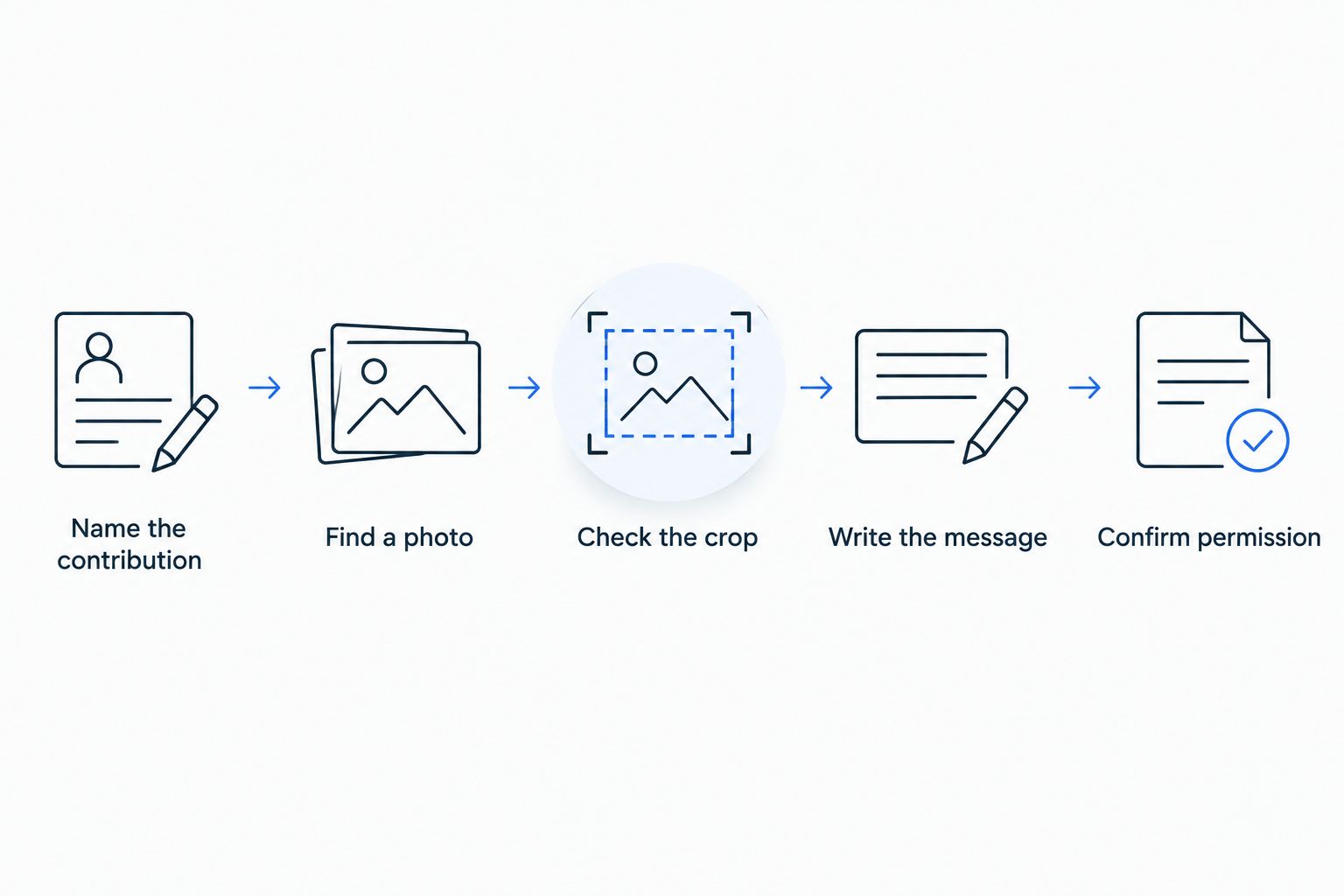
Decide what the award recognises before settling on the image.
Write a message the employee would recognise
An award inscription should say what happened, not rely on a stock compliment. Use the employee's preferred name, a short description of the contribution and wording that sounds natural when read aloud. If a date matters to the memory, check it against the project record rather than guessing.
For example, recognition for a finished team project should identify the project and the employee's role in it. Avoid implying that one person completed shared work alone. Best for: making a familiar workplace photograph feel like a personal thank-you.
- Use the name the recipient uses at work.
- State the contribution in direct language.
- Check project names and dates with the organiser.
- Read the message aloud to catch stiff wording.
Confirm permission and final approval
A photo from a work chat, shared drive or event album is not automatically right for a public presentation or a physical gift. Ask the person responsible for the image and, where appropriate, the people pictured. Check your workplace's rules for using logos, customer material and internal project information.
Give one organiser responsibility for final approval. Too many late edits can introduce spelling mistakes or change the emphasis of the award. For a 2026 event, keep the final approved image and wording together so the version presented matches the version everyone checked.
- Confirm the image can be used for the intended award.
- Remove customer or sensitive workplace information.
- Check names, dates and wording against the approved brief.
- Save the approved image and message as the final version.
Choose the format and plan the presentation
A photo block suits a single image with a short message and a place to display it. It is less suited to telling a long story or collecting comments from several colleagues. Before choosing any supplier, check the available format and its design requirements; the supplied Pixaprints pages do not establish an acrylic award product.
Think about how the recipient will receive it. A private thank-you can feel more personal than an unexpected public handover. If you are planning a 2026 team event, ask whether the employee is comfortable with public recognition before putting their photograph on display.
- Match the format to the number of photos and amount of text.
- Check the chosen supplier's current design requirements.
- Decide whether presentation should be private or shared.
- Prepare a short explanation of why this image was chosen.
Compare photo-led recognition formats
A personalised acrylic photo block employee award is best for one meaningful image with a concise message. Other formats work better when the story needs more space or when the recipient would rather use the gift than display it. This is a format comparison, not a claim that every format is available from Pixaprints; check the current range before you order.
| Option | Best for | Main advantage | Key limitation |
|---|---|---|---|
| Acrylic photo block | One meaningful photo on a desk | Keeps the image at the centre of the gift | Little room for a detailed story |
| Photo book | Several moments and colleagues' messages | Lets you tell the story in sequence | Takes more time to select and organise images |
| Personalised mug | An everyday, informal thank-you | Useful without needing display space | The photograph may receive less attention |
| Photo calendar | A collection of team moments | Gives several images a place in the gift | Needs enough suitable photos to fill it |
Choose the photo book when the recognition is really about a whole project journey. Choose the mug when the recipient prefers a practical gift. Choose the calendar when colleagues want to include several moments rather than select a single winner. Hold off on the acrylic block if the only available photo feels forced or the recipient would not want a workplace image on their desk.
There is no need to put the employee's face on every format. A project image, approved group photograph or other relevant scene can tell the story without making the recipient feel on show. The deciding question is whether they would be happy to keep and see the result.
Common mistakes teams make
Choosing the most polished photo instead of the most meaningful one
A formal event picture can look suitable for an award yet have no connection to the work being celebrated. Ask someone close to the project what the image represents. If they cannot explain the link, keep looking.
Writing a message that could apply to anyone
Thank you for your hard work does not tell the recipient what you noticed. Name the action, project or milestone. If the wording needs private context to make sense, explain it when you present the gift rather than crowding the design.
Treating a shared photo as automatically approved
A team picture can include people who would rather not appear on an award. Check permission before finalising the design, especially if the image came from an internal channel or a client event. An approved alternative is better than an awkward surprise.
Filling every available space
A single clear image and a short message are easier to take in than a crowded collage. When colleagues have much more to say, choose a format that gives their words room. Do not make a desk-sized image carry the whole history of a project.
Assuming the recipient wants a public presentation
Recognition works best when it respects the person receiving it. Some employees enjoy being celebrated in front of colleagues; others prefer a quiet handover. Ask someone who knows their preference, or offer the award privately.
FAQ
What makes a good personalised acrylic photo block employee award?
A good personalised acrylic photo block employee award pairs a meaningful, approved photograph with a short description of the recipient's contribution. Check that the image still works when cropped and that the recipient would welcome displaying it.
Should an employee award show the recipient or the whole team?
Show whichever image best explains the achievement. A team photograph suits shared work when everyone pictured agrees to its use; a project image can work when a portrait feels too personal.
What should I write on an employee photo award?
Write the employee's preferred name and a specific contribution in plain language. Check any project name or date before approving the final message.
Is an acrylic photo block better than a photo book for employee recognition?
An acrylic photo block is better for one image and a short message; a photo book is better for several moments and longer notes. Choose the format that fits the story you want to tell.
Can I use a photo from a work chat for an employee award?
Ask permission before using a photo from a work chat for an award. Check your workplace's image-use rules and whether anyone pictured is comfortable with that use.
How do I choose an award photo if I have no picture of the employee?
Choose an approved image of the project, place or team moment connected to the contribution. If no image tells the story clearly, use a recognition format that does not depend on a photograph.
Does Pixaprints offer personalised acrylic photo blocks?
The supplied Pixaprints pages do not confirm an acrylic photo block product. Check the current range before choosing that format; the photo-selection and wording advice applies whichever supplier you use.
One last thing
Before finalising a 2026 employee award, show the proposed photograph to someone who understands the contribution but did not choose the image. Ask what achievement it brings to mind. If their answer misses the point, change the photo or the message before you turn the memory into a gift.