
Personalised 2027 calendars for personal trainers and fitness coaches
· 12 min read

Personal trainers’ personalised photo calendars are month-by-month displays of chosen images, with the aim of celebrating clients’ effort or making a thoughtful coach gift. A personalised 2026 calendar for fitness coach gifting works best when it reflects real training memories, respects photo permissions and leaves changing workout plans outside the printed design.
TL;DR
- Choose a personalised 2026 calendar for fitness coach gifting around shared memories, not fixed workout prescriptions.
- Pixaprints personalised photo calendars suit coaches who want to turn their own photos into a personal gift.
- Keep client images permission-led, captions encouraging and changing session details in your booking diary.
- Choose a clear theme across 12 months before uploading photos or reviewing layouts.
Why personalised calendars matter for fitness coaches
A coach’s calendar has two different audiences: the person receiving it and anyone who sees it on display. A private thank-you gift can feature shared memories; a calendar displayed in a training space needs images that everyone pictured has agreed to share in that setting.
That distinction matters more than filling every page with exercise photographs. A race finish, a favourite walking route or a team celebration can say more about your coaching relationship than another equipment shot. Start with how to pick photos for a personalised calendar if your camera roll needs a clear selection method.
Pixaprints personalised photo calendars are best for fitness coaches turning their own training memories into a personal gift. Treat the finished calendar as a keepsake with useful dates, not as a replacement for a booking system or an individual training plan.
For a 2026 design, the practical priorities are straightforward: readable dates, suitable photographs and information that will still make sense when that month arrives. Avoid filling the page with promises about results. Celebrate what happened and leave future goals open to discussion.
How to create a calendar your coach or clients will enjoy
1. Choose one purpose before choosing photos
Begin with a note on your phone or a sheet of paper. Write who the calendar is for, where they will use it and what you want them to feel when they turn each page. You do not need a design tool to make those decisions.
A gift from a client to a coach should feel personal rather than promotional. A coach’s gift to a client should recognise that individual without exposing private information. A shared studio calendar needs a broader approach, with images suitable for everyone who uses the space.
Choose one main purpose and let it decide what stays out. Mixing a thank-you gift, an advertising leaflet and a workout tracker creates competing demands on the same page.
- Name the recipient before sorting your images.
- Choose either a private gift or a shared display.
- Write one sentence describing the calendar’s purpose.
- Remove content that does not serve that purpose.
2. Select photos that tell a training story
Make a shortlist in an ordinary photo folder before opening a calendar editor. Look for moments the recipient will recognise: a first event, a favourite class, a scenic route or a cheerful group picture taken after training.
Choose variety without making every page unrelated. A calendar built entirely from near-identical gym selfies feels repetitive; one filled with random images loses its personal thread. You can combine people, places and small details while keeping the same story throughout.
For a 2026 coach gift, use photographs that already have meaning rather than staging an ambitious shoot just to fill gaps. Once your selection is ready, Pixaprints offers personalised photo calendars made from uploaded personal photographs. Sorting first keeps the creative decisions separate from the upload process.
- Create separate folders for favourites and alternatives.
- Mix portraits, wider scenes and meaningful details.
- Prefer original image files over screenshots.
- Reject photos where the important subject is already cropped.
3. Check permission before including other people
Ask each identifiable person whether they are happy for their photograph to appear in the calendar. Explain who will receive it and whether it will be displayed privately or in a shared training space. Permission to take a photograph is not the same as agreement to every future use.
For children’s photographs, check with the parent or guardian before including them. If a picture contains someone you cannot ask, choose another image or crop them out where that leaves a suitable composition.
Before-and-after pictures deserve particular care. Do not treat changes in someone’s appearance as public material simply because you coached them. A celebration of effort, attendance or a shared experience is a clearer starting point for a gift.
- Ask about the specific calendar and its intended audience.
- Confirm the recipient is comfortable with any personal milestone.
- Exclude health information and private coaching notes.
- Keep a written record of agreed photo use.
4. Plan the months before arranging the pages
Write the 12 months in a simple document and assign an image idea to each. You can follow a training story, group pictures by season or give each month a different memory. The best sequence is the one the recipient understands without an explanation.
You do not need a photograph taken in every corresponding month. A winter walking image can fit a winter page even if it comes from a different occasion. Check the meaning of the picture, not just its file date.
For your 2026 calendar, separate confirmed events from aspirations. A completed event belongs in the story; an unconfirmed future race does not belong on a fixed date. Leave booking times and changing training details in the system you normally use.
- Choose purpose: keep the recipient in mind throughout.
- Select photos: give each month a clear visual idea.
- Check permission: approve people and personal details.
- Plan months: arrange the images into a readable sequence.
- Review layout: check the final design before ordering.
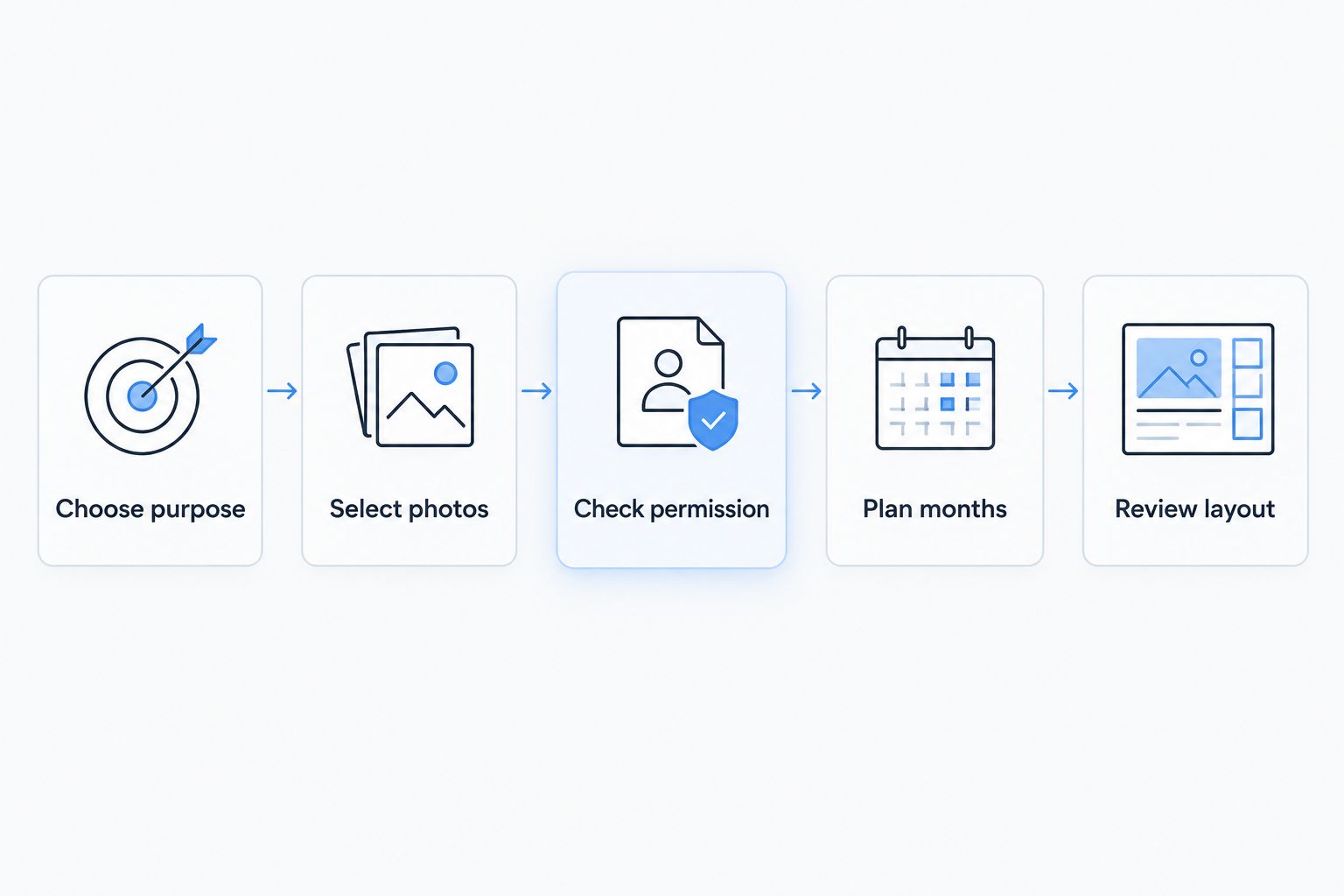
Decide the story and photo permissions before working on the final layout.
5. Write captions that encourage without prescribing
Draft captions in a plain document first. Keep each caption focused on the photograph: the place, the occasion or why that moment mattered. A short, specific memory is warmer than a slogan that could appear on any fitness poster.
Avoid turning the calendar into a set of exercise instructions for an unknown reader. Training advice depends on the person, their circumstances and the coaching relationship. A printed gift cannot account for changes in those circumstances.
If the calendar is for a coach, thank them for something you genuinely remember. If it is for a client, recognise effort without judging their body. Make the caption about the person’s experience, not an appearance target.
- Name the event or location when it adds meaning.
- Use the recipient’s preferred name and spelling.
- Remove weight targets and calorie prescriptions.
- Avoid guilt-based messages about missed sessions.
6. Check crops, readability and calendar details
Review your chosen photos at a larger size before uploading them. Look for blurred faces, awkward background objects and subjects close to the edge. A photo that works as a small phone thumbnail is not automatically a good choice for a printed page.
When reviewing a layout, check the final crop rather than assuming the whole original image will remain visible. Keep faces and important details away from any area the preview shows as trimmed or covered. Follow the requirements shown for your selected calendar rather than applying a generic print-size rule.
Pixaprints provides the photo-personalisation route; you still need to check that your selected design suits the intended use. If you want room for handwritten notes, assess the displayed date layout before choosing it. Do not assume every calendar format offers the same writing space.
- Check all 12 month names and their order.
- Confirm that every page belongs to 2026.
- Review faces, hands and important details in each crop.
- Read every caption for spelling and unintended meaning.
- Verify any event date with the organiser before printing.
7. Proof the gift as the recipient will see it
Complete three proofing passes: photographs, words and dates. Separating these tasks helps you focus on one type of mistake at a time rather than skimming the same page repeatedly.
Then consider the display setting. Would a client feel comfortable seeing that image in a shared studio? Would a coach recognise the moment without a long explanation? Does any caption reveal something that was meant to remain within a private conversation?
For a 2026 gift, keep a final copy of your chosen images and text together. That gives you a clear reference if you notice a mistake before submitting the order. A second reader can help with spelling, but avoid sharing private client material with someone who has no reason to see it.
- Review photographs separately from captions.
- Check dates against a reliable calendar or event source.
- Remove private details before asking someone else to proofread.
- Save your final selection and caption document.
Compare calendar approaches for fitness coaching
Choose a photo calendar for memories, a handwritten tracker for personal notes and a digital diary for changing appointments. These options do different jobs; trying to make one replace all the others weakens the result.
| Option | Best for | Main advantage | Key limitation |
|---|---|---|---|
| Pixaprints personalised photo calendar | Coaches or clients creating a keepsake from their own photos | Uses personal images rather than generic fitness artwork | Printed images and text cannot update when plans change |
| Handwritten calendar or habit tracker | A client recording their own activities | Lets the owner add notes in their own words | Requires ongoing manual entries and does not provide coaching feedback |
| Digital diary | Coaches managing changing session dates | Allows appointments to be edited | Does not provide the same physical photo keepsake |
| DIY photo calendar assembled at home | Someone who enjoys a hands-on gift project | Gives you control over a handmade presentation | Requires your own assembly and careful date checking |
The strongest choice depends on the purpose you set at the start. A photo gift can sit alongside a digital diary without duplicating its job. Likewise, a client can use a separate training log while enjoying the calendar as a reminder of experiences they value.
Common mistakes fitness coaches make with photo calendars
Turning a gift into a sales leaflet
A calendar for an existing client loses its personal feel when every page asks them to book something. Keep the relationship at the centre. If business information is necessary, make it secondary to the memories you are celebrating.
Including a client transformation without asking
Even an image previously shared elsewhere needs a fresh conversation about this use. Ask about the exact photographs, accompanying text and intended audience. Choose a different memory if the person is uncomfortable.
Printing a fixed workout programme for everyone
A shared calendar cannot stand in for individual coaching. Leave exercise prescriptions, progression decisions and adaptations in your normal coaching process. Use calendar captions for memories rather than instructions.
Using tiny collages to fit everything in
More photos do not automatically make a better gift. If each image becomes too small to recognise, simplify the page. Keep one clear focal point and remove weaker pictures rather than shrinking every memory.
Adding dates that have not been confirmed
Do not print a provisional event as a definite appointment. Check it before ordering or leave it out. A handwritten note or digital reminder is a better home for information that still changes.
FAQ
What’s the best personalised 2026 calendar for a fitness coach?
The best choice is a photo calendar built around memories the coach recognises, with clear dates and permission for every identifiable person shown. Pixaprints suits people who want to upload their own photos for a personalised calendar; review the selected layout against your intended use.
Should a fitness coach calendar include workouts?
A gift calendar should not replace an individual workout programme. Use photographs and encouraging captions, and keep changing exercise instructions in your normal coaching process.
Can I use client progress photos in a personalised calendar?
Use client progress photos only after the client agrees to that specific calendar and its audience. Explain whether it is a private gift or a shared display, and leave out private health information.
How many photos should I choose for a coach’s calendar?
Plan an image idea for each of the 12 months, then check what your selected layout requires. Keep alternative photos ready rather than forcing a weak image into a page.
Is a photo calendar better than a digital diary for personal trainers?
A photo calendar is better for a physical keepsake, while a digital diary is better for changing appointments. Use them alongside each other rather than expecting a printed gift to manage live bookings.
Can I make a fitness coach calendar using phone photos?
Phone photos are suitable candidates when the original files are clear and work with the chosen layout. Check the crop and any image-quality guidance during the design process instead of relying on the small phone preview.
What should I write in a calendar for my personal trainer?
Write a specific memory or a thank-you connected to the photograph. Mention a shared event, a favourite training location or something you appreciated, without adding private details or promises about future results.
One last thing
A fitness coach’s calendar does not need to look like a fitness advert. The most meaningful photograph might be a muddy pair of trainers, a familiar park path or a relaxed group moment after an event. Choose the image that brings the relationship back to life, not the one that looks most like a campaign.