
Best Collage Canvas Prints 2026: Ranked by Layout
· 11 min read
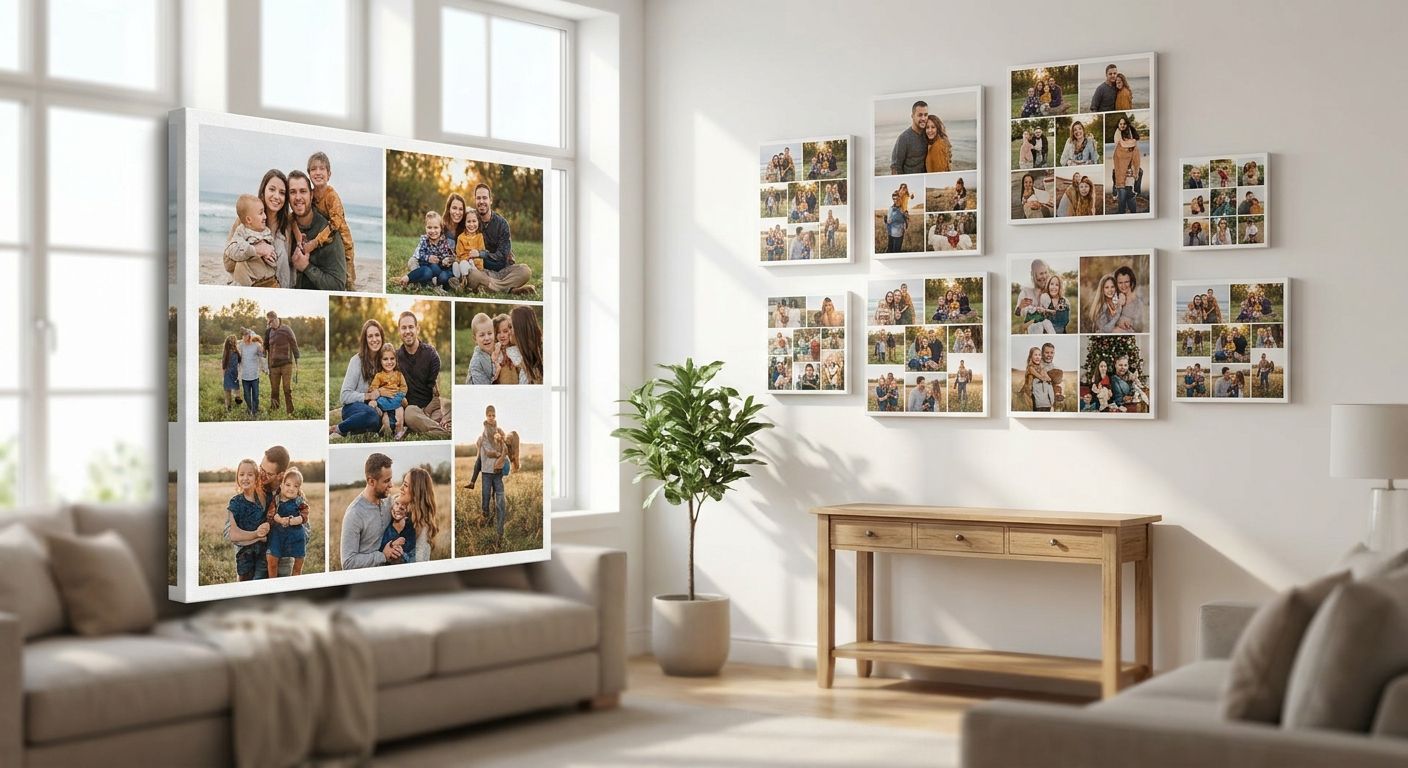
Split-panel canvas layouts win for large statement walls, single-canvas grids win for uniform family galleries, and square-grid layouts win for phone-shot photo dumps from 2026 holidays and days out. Panoramic collage canvases win when the group is too wide for one frame. Pick the layout that matches your photos first, then worry about wall space.
TL;DR
- Split-panel multi-photo canvas is the best overall pick for large living room walls in 2026 — buy it.
- Single-canvas grid collage suits uniform, same-orientation family photos best.
- Square-grid Instagram-style canvas is the easiest option for phone-shot photo collections.
- Panoramic collage canvas is the only real fix for wide group shots that won't crop cleanly.
- Mixed-size storytelling collage works best when your photos are a jumble of portrait and landscape shots.
Why this matters
Most people searching for the best collage canvas prints already have 8 to 20 photos picked out and no idea how to arrange them on a wall without it looking cluttered. The layout you choose decides whether the finished canvas collage prints look curated or chaotic, and it decides how much cropping your photos survive.
Get the layout wrong and you're stuck trimming faces out of group shots or stretching a phone photo until it pixelates. Get it right and the canvas reads as one designed piece rather than five photos stapled together. This guide ranks the five collage formats worth using in 2026, tells you which photo sets suit each one, and gives you a straight verdict on every option.
What makes the best collage canvas print
- Photo orientation match — the layout should suit what you already have, not force you to reshoot or over-crop
- Panel or grid count that suits your wall — three panels needs more width than height; a 4x4 grid needs a squarer space
- Consistent visual weight — a strong layout balances busy photos against quieter ones so no single panel overwhelms the rest
- Cropping tolerance — some layouts protect faces and horizons better than others
- Ease of DIY design — you're arranging this yourself online, so the builder needs to make swapping and resizing photos simple
- How well it reads from a distance — a collage canvas usually hangs above a sofa or stairwell, so it needs to work at 6 feet, not just up close
Collage canvas layouts at a glance
| Layout | Best for | Standout feature | Key limitation |
|---|---|---|---|
| Split-panel multi-photo canvas | Large statement walls | Reads as one piece from across the room | Needs real wall width — cramped on narrow walls |
| Single-canvas grid collage | Uniform family galleries | Even, gallery-style structure | Looks flat if photos are visually mismatched |
| Mixed-size storytelling collage | Blending candid and posed shots | Handles mixed orientations without forcing crops | Takes longer to arrange well |
| Square-grid Instagram-style canvas | Phone-shot photo collections | Matches square phone crops with no distortion | Loses detail on wide or tall originals |
| Panoramic collage canvas | Group shots and wide landscapes | Keeps the whole group or view in frame | Limited to horizontal spaces only |
1. Split-panel multi-photo canvas: best for large statement walls
A split-panel canvas divides one large image, or a set of related photos, across three to five separate canvases hung with small gaps between them. It's the layout most people picture when they say "canvas collage," and it's built specifically for big, empty wall runs above a sofa, bed or staircase.
Split-panel canvas pros:
- Reads as a single cohesive piece even from across a large room
- Scales up easily — add panels for wider walls without redesigning the whole layout
- Works well with one strong photo or several related ones
Split-panel canvas cons:
- Needs genuine wall width; cramming five panels onto a narrow wall looks forced
- Small gaps between panels mean faces or key details near the split need careful positioning
- Not the easiest layout to rearrange once photos are placed
Split-panel canvas pricing follows Pixa Prints' standard canvas pricing at checkout — check current sizes and panel counts on the canvas print builder before you commit. Best for: anyone with a stretch of bare wall above a sofa or stairwell who wants one strong visual statement rather than a scattered gallery. Verdict: Buy if your wall is at least 6 feet wide.
2. Single-canvas grid collage: best for uniform family galleries
This layout places 4, 6, 9 or more photos in an even grid on one single canvas, all cropped to the same aspect ratio. It's the tidiest option on this list and the easiest to keep looking deliberate rather than cluttered.
Single-canvas grid pros:
- Even spacing gives a clean, gallery-wall look without hanging multiple frames
- Straightforward to design — same crop ratio for every photo keeps the builder simple
- Suits family photos taken at similar distances and settings
Single-canvas grid cons:
- Looks flat when photos vary wildly in lighting, colour tone or subject distance
- Forces every photo into the same shape, which can crop out details in wide or tall originals
- Less visually dynamic than mixed layouts
Best for: families who've picked out same-style portraits, school photos, or yearly milestone shots and want them presented as a set. Verdict: Buy for consistent photo sets; Skip if your photos are a mix of orientations and moods.
3. Mixed-size storytelling collage: best for blending candid and posed shots
This format mixes different panel sizes on one canvas — a large hero photo alongside two or three smaller ones — so posed portraits and casual snaps sit together without competing for attention. It's the most flexible layout for photo sets that don't share one style.
Mixed-size storytelling pros:
- Handles portrait and landscape photos on the same canvas without forcing crops
- Lets you highlight one hero photo while still including supporting shots
- Good for telling a story across an event — a wedding, a holiday, a school year
Mixed-size storytelling cons:
- Takes more time in the design tool to balance sizes and positions well
- Can look busy if you try to fit too many photos into one canvas
- Needs a hero photo strong enough to anchor the layout
Best for: anyone combining candid phone shots with a few proper portraits from the same trip or occasion. Verdict: Buy if you're happy to spend a bit longer arranging it; Hold off if you want something you can design in five minutes.
4. Square-grid Instagram-style canvas: best for phone-shot photo collections
Built around square crops, this layout suits photo sets pulled straight from a phone camera roll or social media, where most shots are already close to square or easy to crop that way without losing the subject. If your 2026 photo library is mostly phone shots, this is the layout that needs the least cropping work.
Square-grid canvas pros:
- Matches phone photo aspect ratios with minimal cropping
- Quick to design because every panel uses the same simple square shape
- Works well for photo dumps — 9, 12 or 16 shots from one trip or event
Square-grid canvas cons:
- Loses detail on very wide landscape shots or full-length portrait photos
- Can feel repetitive with too many similar square crops side by side
- Less suited to a single dramatic hero image
If your photos already live on your phone, ordering photo prints straight from your phone into this layout is the fastest route from camera roll to wall. Best for: anyone building a collage from a phone gallery of recent memories rather than a handful of curated portraits. Verdict: Buy for phone-heavy photo sets.
5. Panoramic collage canvas: best for group shots and wide landscapes
A panoramic layout stretches multiple photos across one wide horizontal canvas, or prints one wide image without the cropping a standard aspect ratio would force. It's the only layout on this list built to protect wide group shots and landscape views rather than cropping them down to fit a square or portrait frame.
Panoramic canvas pros:
- Keeps large group shots intact without cropping people off the ends
- Suits landscape and skyline photos that lose impact when cropped square
- Makes a strong focal point over a long, low piece of furniture like a sideboard
Panoramic canvas cons:
- Only works on horizontal wall space; no vertical or square option
- A weak or blurry source photo shows up more at this width
- Not suited to a mixed set of portrait-orientation photos
Best for: wedding party shots, reunion photos, and skyline or landscape images that need the full width to work. Verdict: Buy if you have one strong wide photo; Skip if your photos are mostly portrait orientation.
How this ranking was built
Each layout was judged against the six criteria above: how well it matches common photo orientations, how forgiving it is on wall space, whether it keeps visual weight balanced, how much cropping it forces, how easy it is to design without help, and how it reads from normal viewing distance. Split-panel canvases rank highest overall because they satisfy the most criteria across the widest range of wall sizes; the other four earn their spot by solving one specific photo problem better than anything else on the list.
Which collage canvas print should you choose?
If you're only picking one, the split-panel multi-photo canvas is the safest default for 2026 — it suits most living rooms, hallways and staircases, and it scales from three panels to five without a redesign. Go single-canvas grid instead if your photos are already uniform in style, square-grid if your source photos are mostly phone shots, mixed-size if you're blending candid and posed shots, and panoramic only if you have a wide group or landscape shot that needs the full width to breathe.
Before choosing a wall size, check how to pick the right canvas print size for your wall — layout choice and size go hand in hand, and getting the size wrong undoes even the best layout pick.
Design your collage canvas now
Upload your photos and preview the layout before you order.
FAQ
What's the best collage canvas print layout for a family photo wall?
For a uniform set of family portraits, the single-canvas grid collage works best in 2026 because it keeps every photo the same size and shape. For a mix of candid and posed shots, a mixed-size storytelling collage handles the variety better.
How many photos should go on one collage canvas?
Most collage canvases work well with 4 to 9 photos on a single-canvas grid, or up to 16 on a square-grid layout for smaller phone shots. More than that and individual photos become too small to read from across a room.
Is a split-panel canvas better than a single collage canvas?
Split-panel canvases suit wide, empty walls and read as one large statement piece, while a single collage canvas suits smaller spaces and gives a tidier, gallery-style finish. Choose based on wall width, not personal preference alone.
Can I use Instagram or phone photos for a collage canvas?
Yes — square-grid layouts are built for phone-shot photos and need minimal cropping since most phone camera photos are already close to square. Turning Instagram photos into canvas prints works best when the originals are sharp and well-lit rather than heavily filtered.
What's the best collage canvas layout for a wide group photo?
A panoramic collage canvas is the only layout on this list built to keep a wide group shot intact without cropping people off the ends. It only works on horizontal wall space, so measure before choosing it.
Do collage canvases need photos of the same size or orientation?
Only single-canvas grid and square-grid layouts require matching orientation. Split-panel and mixed-size storytelling collages are built to handle a mix of portrait and landscape photos without forcing you to crop them to match.
How do I stop faces getting cropped out on a collage canvas?
Leave extra space around faces when you upload photos, and avoid placing important details right at a split-panel gap. Mixed-size and panoramic layouts generally protect faces better than tight grid crops.
Which collage canvas layout is easiest to design myself?
Single-canvas grid and square-grid layouts are the fastest to design because every panel uses the same crop shape, so there's less resizing to think about. Mixed-size and split-panel layouts take longer but give more visual variety.
One last thing
The layout mistake that ruins most collage canvases isn't the arrangement — it's using photos with mismatched resolution. A crisp DSLR shot next to a stretched, low-res phone screenshot will show the gap the moment it's printed at canvas size, no matter how good the layout is. Check every photo at full size on a screen before you upload; if it looks soft there, it'll look worse on the wall.